
Summary: AutoScaled Changelog June 2026
What shipped on AutoScaled in June 2026?
June 2026 shipped three updates: incoming webhooks so any tool that can POST data can act as an AutoScaled data source; Auto-Send to deliver generated presentations to the right CRM contact automatically; and a reorganized credit, team, and usage view so plan management is easier to read at a glance.
Human-written articles. AI-powered summaries.
Three updates this month. One opens AutoScaled to any tool that can fire a webhook, not just the integrations listed on the integrations page. One closes the loop on automated presentation workflows by sending the finished deck to the right person automatically. One makes credits, team usage, and plan management easier to understand at a glance.
Here's what shipped.
Connect Any Tool as a Data Source With Incoming Webhooks
Until now, generating presentations from AutoScaled required a native integration: HubSpot, Salesforce, Attio, Google Sheets, Excel, or CSV. Those integrations cover a lot of ground. But not every team runs on a tool that's on that list.
Incoming webhooks change that. Any tool that can send a webhook can now act as a data source for AutoScaled. That means your existing stack, whether it includes a custom CRM, a project management tool, a form submission platform, or an internal system, can trigger personalized presentation generation without waiting for a native integration to be built.
The setup is straightforward. AutoScaled gives you a webhook URL. You configure your tool to send data to that URL when a relevant event occurs. AutoScaled receives the payload, maps the fields to your template, and generates the presentations.
In the app, open Data Sources and use Set up webhook under the Webhooks section to create your endpoint and start a workflow.
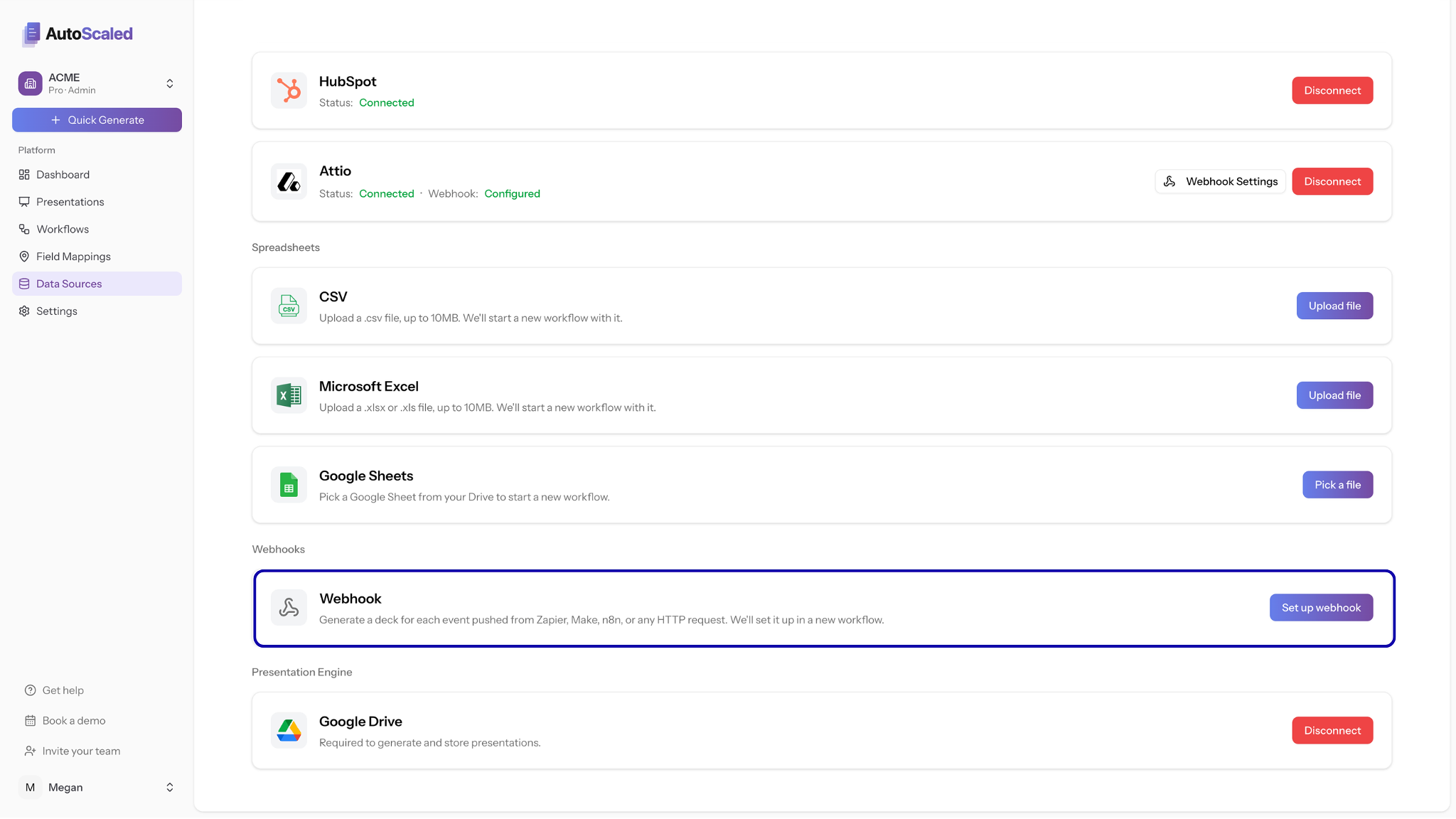
On Data Sources, the Webhooks row is where you configure an incoming webhook for Zapier, Make, n8n, or any HTTP client.
A few examples of what this makes possible:
- A form submission in Typeform triggers a personalized proposal for the prospect who just filled it out.
- A new row added in Airtable kicks off a batch of onboarding decks for the accounts just added.
- A status change in a custom internal system generates a client-facing update presentation without anyone touching a slide.
If your tool can send data, AutoScaled can now work with it.
Incoming webhooks let any system that can POST event data trigger template mapping and presentation generation in AutoScaled.
Presentations Now Send Themselves to the Right Person
Generating a presentation automatically is one thing. Getting it to the right person without a manual step in between is another.
Auto-Send closes that gap. After AutoScaled generates a presentation, it can now automatically share it with the intended recipient, pulled directly from your data source. Use {{email}} when confirming your workflow, or map an email field from your connected CRM, and AutoScaled handles delivery as part of the same workflow.
Each generated presentation goes to its own recipient. A batch run of 50 proposals sends 50 separate, personalized presentations to 50 different people. No manual distribution. No downloading and forwarding. No copy-pasting email addresses.
The recipient receives a branded, trackable share link. You get engagement data back: when they opened it, how long they spent on each slide, whether they forwarded it. The full presentation sharing and analytics layer that AutoScaled already provides, delivered automatically to the right inbox at the right moment.
Auto-Send resolves the recipient from a CRM email field or {{email}} placeholder, then delivers a branded share link to their inbox instead of an attachment.
For teams running high-volume outbound or recurring account communications, this turns AutoScaled from a generation tool into an end-to-end presentation workflow.
Credits, Teams, and Usage: Now Easier to Manage
The credit system update is not a new feature. It is a meaningful improvement to something that should have always been clearer.
Credit management, team member visibility, usage breakdowns, and pooling logic are now surfaced in a single, reorganized view. If you manage a team on AutoScaled, you can now see at a glance how credits are being used, by whom, and where the balance stands. Adding team members, adjusting access, and understanding your usage pattern no longer requires digging through separate sections of the platform.
If you have had questions about how credits work or where they went, this update is the answer.
The webhook update in particular is one worth testing if you have been working around a missing integration. The setup takes a few minutes and the payoff is AutoScaled working with tools you already have, on the schedule you already run.
The 14-day Pro trial is free, no credit card required, and takes 5 minutes to set up. Start your trial here.
AutoScaled publishes a changelog every month. Subscribe below to get product updates, guides, and automation workflows for sales teams delivered to your inbox.


