
Summary: 7 Ways to Personalize a Sales Deck Without Rebuilding It Every Time
How can sales teams personalize decks at scale without rebuilding from scratch for every account?
Personalized sales decks close more deals when personalization is systematic, not a one-off rebuild per account. Seven approaches scale relevance from one approved template:
- CRM variable fields that populate automatically on every run
- Industry-specific slide variants selected from CRM data
- Commercial slides (pricing, ROI) tied to live deal fields, not just the cover
- Dynamic case studies matched by industry, size, or use case
- Prospect-specific ROI calculations on impact slides
- Next steps pre-filled with owner, calendar link, and timeline
- Trackable share links that turn engagement into follow-up context
Full personalization leads to roughly 47 percent higher engagement than a title-slide name swap. Rebuilding from scratch is not required when the template and CRM connection do the work.
Human-written articles. AI-powered summaries.
7 Ways to Personalize a Sales Deck Without Rebuilding It Every Time
Personalized sales decks close more deals. That part is not in question. Research across B2B sales contexts consistently shows that customized presentations outperform generic slides on engagement and internal sharing, and analysis of over 1.3 million presentation sessions found that decks with company name, tailored slides, and a personal message saw a 47 percent uplift in engagement compared to generic versions. The data is clear.
The obstacle is operational. Forrester's sales content research found that 70 percent of sales reps spend between one and fourteen hours every week customizing content for buyers. The reason most reps fall back on a generic deck is not that they do not understand the value of personalization. It is that rebuilding a deck from scratch for every account is not a realistic use of their time. If that sounds familiar, why reps spend 4 hours per proposal maps where those hours go when every field is still filled by hand.
The good news is that rebuilding is not the only way to personalize. Here are seven approaches that deliver meaningful personalization without starting from zero every time. For the buyer-side case against generic decks, see why generic pitch decks lose deals. If several operational friction patterns here sound familiar across the org, 7 signs your sales team needs presentation automation is a practical checklist before you scope tooling.
1. Use Variable Fields That Pull From Your CRM Automatically
The most scalable form of personalization is the one that requires no manual effort after initial setup. Variable fields in a presentation template act as placeholders that get replaced automatically with live data from your CRM or connected data source when the deck generates.
A slide that reads "Prepared for {{company_name}}" becomes "Prepared for Acme Corp" for one account and "Prepared for Meridian Group" for the next, without a rep touching either version. The same logic applies to deal value, contact name, account rep, pricing tier, industry, renewal date, and any other field stored in HubSpot, Salesforce, or Attio.
AutoScaled was the first presentation automation platform to introduce AI-driven field detection: upload any existing deck and the platform automatically identifies which fields should be replaced and maps them to your connected CRM data, no placeholder markup required. If you prefer explicit control, you can mark up the template with {{field_name}} syntax before uploading. Either approach produces the same output: a fully populated, personalized deck generated in seconds, not hours. For HubSpot-to-Google Slides setup, see How to Auto-Populate a Google Slides Template from HubSpot CRM Data. Presentation templates with variables walks through both mapping paths; presentation automation for sales covers triggers, batch runs, and trackable links in the wider workflow.
This approach is particularly powerful for teams managing high account volumes. The personalization happens automatically for every record in the run, whether the batch is five accounts or five hundred.
2. Build Industry-Specific Slide Variants Into the Template
Not every account needs a fully custom deck. Many accounts need a deck that speaks to their vertical. A financial services firm has different compliance concerns than a SaaS company. A manufacturing client has different operational priorities than a professional services firm.
Rather than rebuilding slides for each industry, build a small library of industry-specific slide variants, one problem statement slide per vertical, one relevant case study per industry, and configure the template to include the correct variant based on an industry field in the CRM.
When the presentation generates, the automation selects the relevant slide set for that account's industry and includes it in the output. The rep does not choose the variant. The data does. The result is a presentation that reads as if it was built for that industry without requiring the rep to construct it that way manually.
This approach works best when managed at the template level rather than left to individual reps. The industry variants are built once, approved by marketing or enablement, and then applied automatically based on CRM data. How to set up a triggered sales content workflow without code covers firing those runs from CRM stage changes when you want decks to generate without a rep starting the batch.
3. Personalize the Commercial Slides, Not Just the Cover
The most common form of surface-level personalization is adding the prospect's company name to the title slide and leaving the rest of the deck generic. Buyers notice. A presentation that opens with their name and then delivers the same pricing table, the same feature list, and the same case study as every other prospect receives is not personalized. It is branded.
Meaningful commercial personalization happens in the slides where money is discussed. The pricing slide should reference the specific tier relevant to the account's size. The ROI calculation should use the prospect's own figures where known: their current contract volume, their team size, their estimated time spent on the process being automated.
These slides change how the presentation reads internally after it is forwarded. A CFO reviewing a pricing slide that references their organization's actual scale and commercial terms reads differently from one built around a generic pricing matrix. That difference matters in deals where internal circulation determines whether the proposal advances.
Variable fields make this automatic. Price tier, contract volume, company size, and recommended configuration are all fields that can live in a CRM record and populate a presentation template without manual entry. When those values still move by hand, copy-pasting CRM data into sales content is killing your close rate explains the error and trust cost that shows up first on pricing and terms slides.
Personalized pitch deck template cycling through CRM fields: company, industry, benefits, and industry image.
4. Replace the Case Study Dynamically Based on Account Attributes
Case studies are one of the most powerful slides in a sales deck and one of the most commonly misapplied. A financial services prospect shown a case study from a retail company has to do mental work to understand why it is relevant. That work creates friction. Friction creates doubt.
The fix is not to build a separate deck for every account type. It is to configure the case study slide as a dynamic element that pulls from a library of approved case studies based on the account's industry, company size, or use case, using data already in the CRM.
When the presentation generates for a fintech company, the relevant financial services case study appears. When it generates for a logistics firm, the operations-focused case study appears instead. The rep does not select it manually. The automation matches the attribute to the relevant asset and includes it in the output.
This requires upfront work in template configuration: building the case study library, defining the matching logic, and confirming the CRM fields that drive the selection. That investment pays off across every subsequent presentation the template generates.
5. Include Prospect-Specific Data in ROI and Impact Slides
Generic ROI claims are one of the weakest elements in a B2B sales presentation. A slide that reads "Teams save up to 8 hours per week" is easily dismissed as marketing language. A slide that reads "Based on your current team of 12 reps each sending 15 proposals per month, AutoScaled would recover approximately 180 hours of selling time per month" is harder to dismiss because it requires a response.
Prospect-specific ROI calculations require knowing the prospect's operational data, much of which is often gathered during discovery and stored in CRM fields. Team size, current volume of presentations per month, average time per presentation, and deal size are all inputs that can be pulled into a dynamic ROI calculation embedded in the presentation template.
The calculation updates automatically for each account based on the values in their CRM record. The rep does not run the numbers manually. The slide does it for them, and the output is specific enough to serve as a genuine talking point rather than a generic claim.
6. Pre-Populate the Next Steps Slide With the Right Contact and Timeline
One of the most underutilized personalization opportunities in a sales deck is the closing slide. Most teams use a generic "Next Steps" slide with placeholder instructions that every rep updates manually, or more often, does not update at all.
A pre-populated next steps slide that includes the account rep's name, their direct calendar link, and a proposed timeline based on the account's renewal date or expected close date reads as a considered proposal, not a template. It signals that the rep has already thought about what happens after this conversation and is prepared for it.
These fields are all pullable from a CRM record. Account owner, owner email, close date, renewal date, and proposed implementation timeline are standard fields that populate a next steps slide without manual input. The effect is a closing slide that moves the conversation forward rather than stalling it.
7. Send a Trackable Link and Personalize the Follow-Up Based on Engagement
Personalization does not end when the deck is sent. The follow-up conversation is also an opportunity to be specific, and the most specific follow-up is one that references what the prospect actually engaged with.
AutoScaled generates branded, trackable share links for every presentation. Those links show which slides the prospect spent time on, how long they reviewed each section, and whether the deck was shared internally. A prospect who spent four minutes on the pricing slide and forwarded the deck to their CFO is giving a clear signal before the follow-up call happens.
That signal allows the rep to open with something specific: "I saw the pricing section got some attention. I wanted to walk you through how we would structure that for your team size." That is a different conversation from "Just checking in to see if you had a chance to review what I sent."
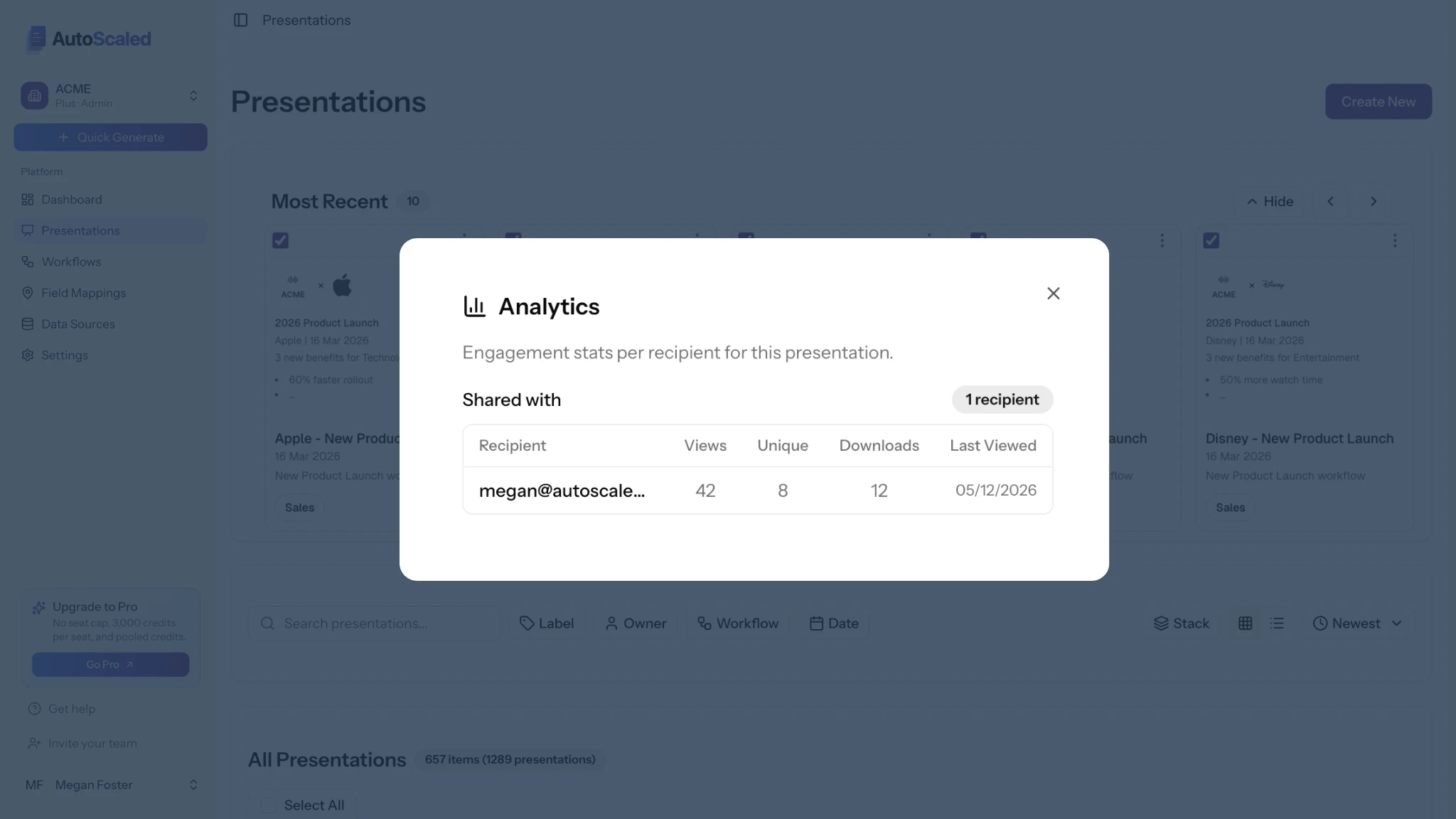
Slide-level engagement shows which sections prospects reviewed so follow-up can reference pricing interest instead of a generic check-in.
The presentation itself has already done personalization work. The trackable link turns the follow-up into a continuation of that work rather than a reset. What is sales content automation ties creation, distribution, and engagement analytics together when personalization is meant to be systematic across the team, not selective and manual.
If you are ready to build a presentation template that personalizes automatically across every account your team manages, try AutoScaled free for 14 days. No credit card required. Setup takes three minutes.
If systematic personalization across a sales team, not just selective and manual, is where your attention is going, The Scale newsletter by AutoScaled covers what's working across GTM teams right now. No fluff. No hype. Subscribe here and we'll send it straight to your inbox.


